Spreading the AI word to Brazil/Portugue speakers: AWS Marathon IA e ML 15 e 16 de março de 2023


Spreading the AI word to Brazil/Portugue speakers: AWS Marathon IA e ML 15 e 16 de março de 2023
Reblogging just because of Nick’s Machine (actually really great content).
The pros and cons of parallelism have always been with us in SQL Server and I blogged about this a couple of years ago. This is an updated version of that post to include details of the new wait stat related to parallelism that was added in 2017 (CXCONSUMER), as well as to discuss the options available for cloud based SQL Server solutions.
There’s no doubt that parallelism in SQL is a great thing. It enables large queries to share the load across multiple processors and get the job done quicker.
However it’s important to understand that it has an overhead. There is extra effort involved in managing the separate streams of work and synchronising them back together to – for instance – present the results.
That can mean in some cases that adding more threads to a process doesn’t actually benefit us and in some cases…
View original post 1,526 more words
This post is long overdue, but the great folks at SQLServerCentral are just updating their tutorials on Machine Learning on SQL Server and that is a great opportunity for a refresher.
Recently Microsoft has released much improved versions of SQL Server software, both for server-side and client-side, so this post is mainly to point you to the right direction to find the best resources and update your suit of Database Administration tools.
Firstly, here is the first article on the Stairway to ML Services from SSC. You will need to install these modules at the database server. Then there is the new SQL Server Management studio installer. For the first time in a lot of time, the standalone SSMS installer works as expected, with no need to get access to a full server ISO file to get the complete Management Studio package.
Finally, the new SQL Server Data Tools (SSDT) are a much improved version of BIDS, that now it is integrated into Visual Studio Community 2019. You will need to install VS Community first, then add the appropriate extensions from within the application. Be sure to look for the SQL Server Integration Services Projects.
While you are at it, you can give a try to Visual Studio Code. This is a text-based code editor that has extensions to lot more languages and services than just the classic Visual Studio IDE that we all know.
Connecting all these tools and making the best use of cutting-edge technology is a long learning journey. I guess not only the Machines are Learning after all!

As it turns out, the last goal related to this blog was not exactly met. However the year was quite busy and full of projects, with great outcomes and even more to come. This means I will continue posting to help others, but unfortunately at a slower rate.
The “one post per month” idea was nice but not realistic, and this taught me an important lesson regarding my goals – both personal and professional. So I decided to take a more cautious approach and start this year by inviting my readers to think about what happened to Cloud Computing during 2019 and what are the predictions to 2020.
What is your opinion on the predictions between last year and this year?
As you may see, this blog will start to focus more and more on the cloud aspect of IT. However there is still a need to understand more of the Database aspect of cloud computing, so both will exist here. And in defense of that previous goal, I have almost as much drafts as posts on this blog – things that I still would like to share and teach more people how to handle the daily challenges of an IT DBA or Cloud Specialist. Let’s see how it goes, and happy new year!

Ok, so I realized my first goal mentioned in the last post was not particularly clear. Let’s iterate and improve, agile, sprint, and all that jazz. First adjustment is: I will easily post at least one interesting piece every month of 2019. How about that?
Let’s go straight to business then: this month’s post will be about knowing when to decommission old IT assets, in particular legacy technology. I subscribe to a few newsletters, and one that catches my attention frequently are the editorials from sqlservercentral.com. Below you can find a quote from today’s editorial, by Steve Jones.
When working on a large project, it’s hard to sometimes keep perspective on whether to keep going or stop and change directions. We often try to continue to improve and fix a project, even when it is not going well. (…) If I’ve spent $20 or $20mm on a project and I am evaluating whether to spent an equivalent amount moving forward, I can’t continue to worry about the money I’ve already spent.
That money is gone whether I stop now or continue on. What I ought to do is look forward and decide if future spending is worth the investment. Certainly my reputation, and often some pain for switching or decommissioning existing work is to be considered, but that’s part of the value and too often we become afraid of abandoning something we ought to get rid of for a newer, better something else.
This is an interesting point of view on how to handle your virtual legacy. You have to make a call at some point. He then links to another article which is also interesting, by Leon Adato from DataDiversity.net.
If you find yourself at a point where you’re justifying not changing a system because that system cost you so much in the first place, (…) consider the goals you had for the original implementation of that legacy technology. Ask yourself:
– Are the original goals for this technology still valid for the business?
– Is the current technology meeting those goals?
If the answer to either one of those questions is no, then it’s time to pull the plug. The moment you say it’s OK to live without something fundamental, like security patches, support, or the ability to upgrade, you’re failing.
Those are some really important considerations, and probably questions all of us in the IT industry should ask ourselves more often. Go ahead and take a look at both articles. Following post is due next month (which is like, tomorrow!). Cya!
Today is the first business day of the year, and after a much deserved break around year-end holydays, I stumbled upon a video with great tips on how to set goals for yourself. As 2019 just started it is a great time to think about my own goals, and I wanted to share this example here so it can help you too.
This video is from an youtuber/streamer that usually does videos about videogames, and although unexpected it is actually a very good example of how you can set goals for anything in your life. Lowko also highlights the importance of having separate goals to each aspect of your life, know how to measure your progress, look and work on them everyday, and have a positive approach in the whole process.
I like working with short-term and long-term goals for both my personal and professional life, constantly reviewing and adjusting them as I progress. Though I do not usually keep close track of progress this is adjustable, and the positivity thing is a good incentive in the whole process, instead of only celebrating at the end (which can be very, very far away for some goals). Also, accountability is something very important to me.
With renewed inspiration, I would like to share my first goal of the year with you, dear reader. It is directly related to this blog: since its start there was a considerable number of viewers that came here to get help, but over the past few years this has diminished. So the first short-term goal (2019) is to share more experiences and knowledge with more frequent posts. The mid-term goal (2 to 3 years frame) is to revert the audience stats and start to grow the page views again. The long-term goal will continue to be to share knowledge and help people with topics involved with the blog main themes (mostly Databases and Virtualization/Cloud).
I always had these ideas in my mind, but having them as goals written down is very helpful and gives some ground to check if I’m in the right track. To help measuring myself, I’m including a yearly statistics report here, which will be checked early next year to see how things are progressing (what else did you expect a DBA to do? lol).
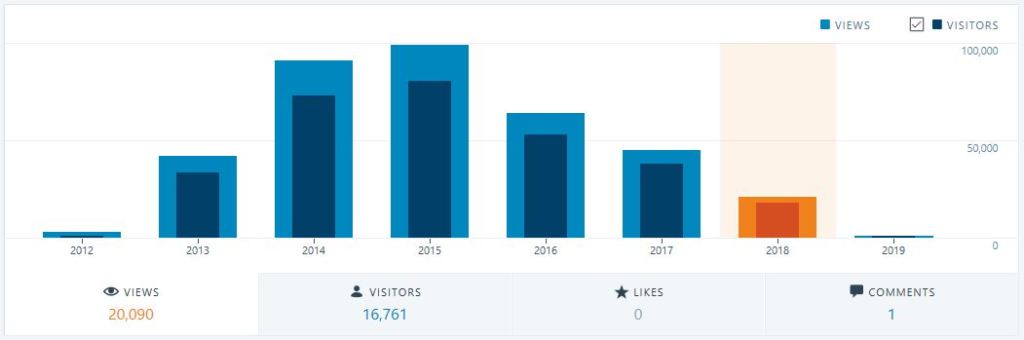
This very first post is part of these new goals and I will close it as Lowko himself would say: I want to thank you all for reading, have an amazing day, do not forget to smile, and I will see you in the next one! Cya!
Quick post on some portuguese training resources this time:
Quoting a great and concise article from SQLServerCentral: http://www.sqlservercentral.com/articles/Azure+SQL+Data+Warehouse+(ASDW)/172251
It is always good to know the options available when you are considering the best cloud provider for your needs. See below a summary of each option available currently.
Azure DWH part 28: The ASDW enemies
By Daniel Calbimonte, 2018/06/26
Introduction
Superman has a Lex Luthor, the Ninja Turtles have The Shredder, the Smurfs have a Gargamel, Mozart had a Salieri, Edmon Dantès had a Ferdinand and in our case, Azure data warehouse has multiple enemies.
This time we will talk about the competitors. What do they offer? We will mention the following enemies:
- Amazon Redshift
- Alibaba Cloud Max Compute
- Snowflake
- Google Big Query
- Teradata
Amazon Redshift
Amazon RedShift is the first enemy of ASDW. Amazon RedShift is a petabyte database service in the cloud. It is similar to ASDW, and as of now, it is the most popular cloud service (Azure is the second one). Redshift started in 2012 and is based on PostgreSQL, and it is easy to use and scale.
If you are familiar with PostgreSQL and you prefer over SQL Server, it is a good choice. ASDW is similar to SQL Server and it can be used with the SQL Server Management Studio. Then, if you like SQL Server, you will prefer ASDW.
Amazon offers a data warehouse in the cloud that is easy to maintain at a low cost. The biggest advantage in the cloud is that you can scale easily. If you have a data warehouse on-premises, if you need to scale, you need to buy new hardware, migrate data and suffer a lot. It can be easily integrated with well known BI tools like MicroStrategy, Jaspersoft, Pentaho, Tableau, Business Objects, Cognos, etc. It is also easy to create replicas of your data warehouse in different regions. It is also very easy to restore and encrypt your data.
I think it is the closest competitor because it offers a Database Platform with multiple services. Not only a data warehouse in the Cloud but also several other services.
Prices
Regarding prices, currently there are 3 options:
- On-demand pricing is a pay per hour. The payment depends on the Memory, Storage, CPU, IO, Region. For example, the price for the category dc2.large is 0.25 USD per hour and a dc2.8x.large is 4.8 USD per hour.
- Redshift spectrum query charges 5 USD per Terabyte scanned.
- Reserved instance pricing lets you save 75% of the price on-demand, but you should use the services per 1-3 years.
For more information about prices, refer to this link: Amazon Redshift Pricing
Web page
Tutorials
- Getting Started with Amazon Redshift
- Introduction to Amazon Redshift – data warehouse Solution on AWS
Alibaba Cloud Max Compute
Alibaba is part of the Alibaba Cloud applications it is a database cloud-based used as a data warehouse. This Cloud Datawarehouse claims to be very secure compared to the competitors and complies with the HIPAA for healthcare and Germany’s C5 standard, PCI DSS.
It supports SQL, Graph, MapReduce, MPI Integration Algorithm. It works with a Batch and Historical Data Tunnel, which is the service provided for the users to import and export data with a service easy to scale.
The Data Hub is used to easily import incremental data. It uses a 2D table storage with compression to reduce costs. It also supports Computing-MapReduce and Computing Graph. It also supports REST API and it has his SDK, Graph, SPARK, and SQL. It is not very popular yet, but it is in the race.
Prices
Less than 1 GB or less is free. 1-100 GB costs between 0.0028 and 0.28 USD. 100 GB-9 TB costs between 0.0014 -13 USD approx. 9 – 90 TB between 12 USD to 120 USD approx. For more information about prices refer to this link: Max Compute Prices
Web page
Tutorials
Snowflake
Snowflake is another data warehouse database based in the cloud. It is a great data warehouse solution, but it is not part of a Data Platform. It means that is not part of a solution like AWS, Max Compute, and Azure that offer other additional services in the cloud. It is just a data warehouse in the cloud, but it is a good one.
Snowflake supports SQL to access data and you can access semi-structured data like JSON. It is possible to access to non-relational data using SQL like we do with ASDW using PolyBase. It also offers to scale immediately and columnar storage. You can connect to Snowflake using Java (JDBC) or ODBC. There are also web consoles, native connectors, and the command line.
Snowflake claims to have a better architecture designed for the cloud and it is optimized for better performance.
Prices
Currently, the prices depend on the Region and edition. There are several editions like the Enterprise, Standard, Premier, Enterprise for Sensitive Data and virtual private Snowflake.In USA west and east, all the versions cost 40 USD per TB per month for storage, with the compute costing 2.25 and 2 USD per hour. The Enterprise Edition and Enterprise for Sensitive Data cost 3 and 4 USD PER compute hour, respectively.
For more information about prices, refer to this link: Select Pricing For Your Region
Web page
Tutorials
Google Big Query
Big Query uses a serverless system that can handle petabytes of data. This is a solution that offers really fast queries; it is able to handle queries of petabytes of data in seconds. The Google guys are experts on Big Data and Google Big Query shows the power they have. Big Query is like any Google technology: cloud-based, fast, easy to learn, and simple.
It also uses SQL to access data. Big Query works with the Google Cloud Storage, and it works with the following technologies:
- Informatica
- Looker
- Qlik
- snapLogic
- Tableau
- Talend
- Google Analytics 360 Suite
Big Query has a web console (Web UI) to access the data. It also includes a command line tool or you can use REST API to query information. You can use Java, Python or .NET to access data.
The Big Query concept is to run a query with terabytes of information in seconds or minutes. You do not need a virtual machine and you do not need to worry about configuring hardware and software.
Pricing
The storage costs 0.2 USD per GB per month. The first 10 GB are free. If it is a long-term storage, it costs 0.1 USD per GB. The queries cost 5 USD per GB. Load and copy data is free. For more information about pricing, refer to this link: Big data pricing
Web Page
https://cloud.google.com/bigquery/
Tutorials
Teradata
Teradata is a very popular database. It is commonly used as a data warehouse and also as a large scale database. It is one of the most popular databases in the world and many people like it. However, like SnowFlake, it is a single isolated solution and not part of a database platform like Azure or AWS or Alibaba Max Cloud. Those platforms offer not only a data warehouse, but also other solutions to complement it.
You have 3 options with Teradata:
- IntelliCloud™ offers a Teradata database in the Cloud+Aster Analytics+Hadoop.
- Public cloud offers a Teradata database+Aster Analytics in AWS or Azure.
- Private Cloud offers virtualized VMs with IntelliCloud and Public Cloud.
You can query using Big Data technology using Teradata QueryGrid™. It is possible to have your database in the cloud, on-premises or in a hybrid environment. It also includes an In-Memory Intelligent Processing and a gateway to actionable Data Insight.
Pricing
The prices vary by the different editions. The developer edition is free. The Base, Advanced, Enterprise and IntelliSphere have different prices per hour. For example, the EC2 m4.4xl costs 1.564 USD per hour and the Enterprise 4.17. For more information about prices, refer to this link: Teradata Software Pricing
Webpage
Tutorials
Conclusion
In this article, we saw different alternatives to create our data warehouse in the cloud. As you can see, there are a lot of competitors. Many of them have almost the same features. The price options change over the time. Even the features improve each day. It is good to know the competitors and check all the options available in the Cloud Data Word house world.
References
This post has content in Portuguese language, but most of courses are in english.
Aniway, it’s always good to learn. Why not learn another language?
Microsoft free courses in IA, DevOps and Cloud: https://news.microsoft.com/pt-br/microsoft-abre-ao-publico-cursos-de-treinamento-em-inteligencia-artificial/ & https://academy.microsoft.com
Google training at Brasil: http://idgnow.com.br/carreira/2018/04/23/google-oferece-treinamento-gratuito-para-4-mil-profissionais-de-ti-em-sp/
cya!
Yes, the post title is singular, but there are two threats. It’s a joke, because both are kinda similar. In this day and age, we all should be familiar with the importance of digital security. Almost every year there are some brand new virus or bad-bad programs being released in the wild. You have to keep vigilant but at the same time don’t panic.
So this is a quick blog post to gather some resources on the newest threats that are so famous today. Take a moment to read throught it if you want more details, but if not just make sure to help us apply the updates as soon as they become available.
Understanding Meltdown & Spectre: What To Know About New Exploits That Affect Virtually All CPUs
Critical SQL Server Patches for Meltdown and Spectre – SQLServerCentral
Quote from Steve Jones, from SQLServerCentral:
It’s Time to Patch and Upgrade
By Steve Jones, 2018/01/05
I don’t want to be chicken little here, but the Meltdown/Spectre bugs have me concerned. I don’t know the scope of the vulnerabilities, as far as exploits go, but I do know the lax ways in which humans interact with machines, including running code, opening untrusted documents, and just making silly mistakes. No matter how careful you think you are, can you be sure everyone else in your organization is just as careful? Are you sure they won’t do something silly from a database server? Or do something from a server (or workstation) that has access to a database server? Or use a browser (yes, there’s an exploit)
PATCH your system, soon.
Vulernabilities in hardware are no joke, and even if you think you’re fairly safe, it’s silly to let this one go by and assume you won’t get hit. The advent of widely deployed scripting tools, botnets, and more mean that you never know what crazy mechanism might end up getting to your database server. Is it really worth allowing this when you can patch a system? This is a no brainer, a simple decision. Just schedule the patches. With all the news and media, I’m sure you can get some downtime approved in the next few weeks. After all, your management wouldn’t want to explain to their customers any data loss from this any more than you’d want to explain it to your boss.
We’ve got a page at SQLServerCentral that summarizes the links I’ve found for information, patches, etc. I’m sure things will change rapidly, and I’ll update the article as I get more information. The important things to note are that not all OSes have patches yet, and there are situations where you might not need to change anything. That’s good, as there are some preliminary reports of patches causing issues with performance (degrading it) for PostgreSQL And MongoDB systems. I did see this tweet about no effects on SQL Server, which is good, but YMMV.
Most of us know patching matters, and we need to do it periodically (even if it’s a pain), however, many of you are like me in that you rarely upgrade systems. Once they work, and because I have plenty of other tasks, I don’t look to necessarily upgrade a database platform for years. One downside to that is that a major vulnerability like the Meltdown/Spectre attacks is that patches likely won’t come out for old system and versions of SQL Server. That is the case here.
That means that if you’re on SQL 2005-, or even on older Windows OSes, you might really consider planning an upgrade. Even if you aren’t overly worried about this exploit, you won’t want a vulnerability to live for a long time in your environment. You never know when a firewall will change, server will move, or some malware will slip through (did I mention the browser exploit?). Plan on an upgrade. I’ve started asking about accelerating our upgrade plans, and you might think about that as well. I know management doesn’t want to spend money unneceesarily, but this feels necessary, and a good time to refresh your system to a supported version.
In general I like to delay my patches slightly from the world and not be on the bleeding edge. That’s fine, but don’t wait too long with this one. I would hope that most people get systems patched in the next month. If not, don’t expect any sympathy if you lose data.
Keep calm, patch your systems and…


 The Lonely DBA